

How AI Memory Works and Why It's More Portable Than You Think
AI chat tools don’t learn you over time. They read a structured profile at the start of each session. That profile is stored outside the model, not inside it, which means it’s portable. MSPs who understand this distinction avoid vendor lock-in and retain control of their most valuable asset: institutional context.
You’ve been using ChatGPT for six months. It knows your writing style, your role, your go-to frameworks. It finishes your sentences. You start to think the thing has actually learned you.
It hasn’t. The model’s weights were set during pretraining and do not update based on your individual usage. What feels like a deepening relationship is a saved profile being fed back into the system every time you send a message. According to DataCamp’s LLM memory architecture documentation, effective LLM applications combine context windows with external memory systems, using the context window for short-term information while storing long-term memory separately. Your AI isn’t remembering you the way a colleague would. It’s reading a dossier about you before it answers.
That distinction matters if you’re an MSP leader making platform decisions. If your AI personalization is external, it isn’t inherently tied to any one vendor. Which means you can move it.
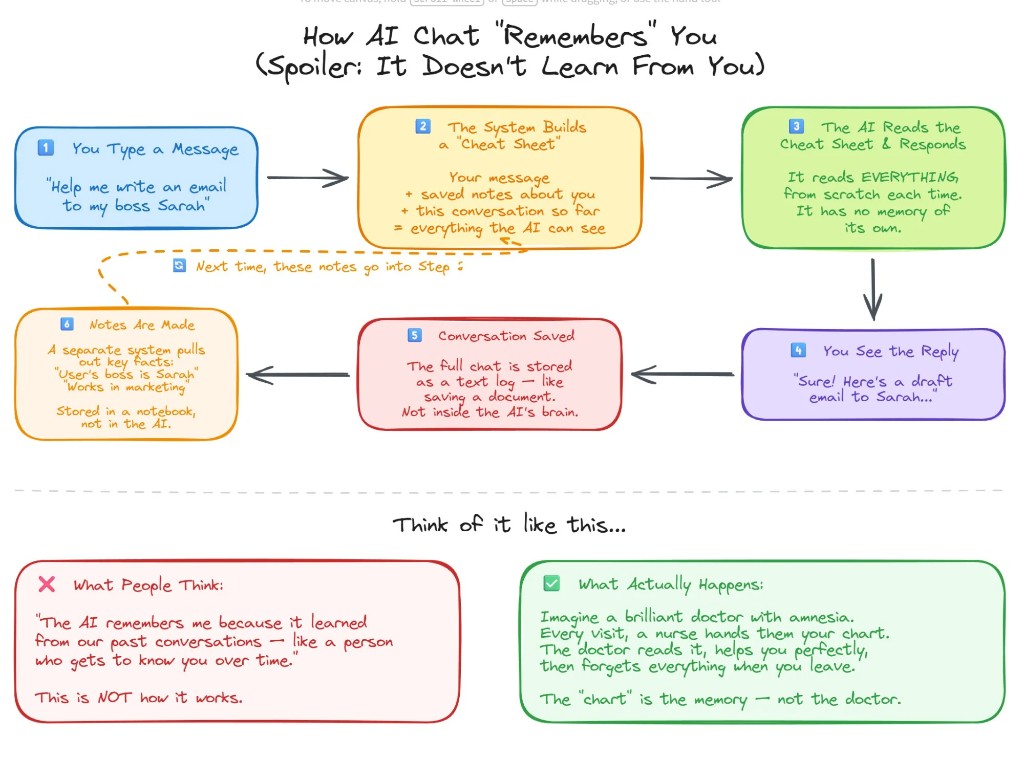
How Does AI Memory Work?
If you’ve used ChatGPT for more than a month, you’ve felt it: the tool seems to get smarter over time, like a new hire who gradually figures out how you operate. The reality is less romantic.
Every time you send a message, the model generates a response from scratch. It reads your current prompt, the visible conversation history, and whatever instructions are tied to your account. Then it responds. Then it forgets. There is no internal diary. No evolving understanding. The model you’re talking to today is functionally identical to the one you talked to six months ago.
What changed is the profile your platform built around it. Your preferences, your tone, your recurring projects, your role. That structured context gets reinserted at the start of each session, and the model reads it fresh every time. The “relationship” you feel is real output from artificial memory.
What Are the Three Layers of AI Memory?
To understand how an LLM “remembers” you, separate three layers that often get lumped together: the context window, the memory system, and the model itself.
The context window is the model’s working memory for a single session. It holds your current prompt, the visible conversation history, and any instructions tied to your account. According to DataCamp’s LLM memory documentation, short-term memory systems manage information within the current session by leveraging the context window. Once the session ends or the window fills up, that information is gone.
The saved memory system stores structured notes about you outside the model’s neural network: your role, company type, preferred tone, recurring projects. This information is stored externally as metadata and reinserted into the prompt when relevant. It’s the layer that makes the AI feel like it knows you, even though the model underneath hasn’t changed at all.
The model itself was trained on massive datasets long before you logged in. Its weights were set during pretraining and don’t update based on your individual usage. It generates responses based on patterns it learned well before your first prompt.
When these three layers work together, the output reads like a continuous relationship. But your personalization lives outside the model, which is the key insight: if AI memory is external, it isn’t tied to any one vendor.
Why Does AI Memory Portability Matter for MSPs?
For MSP leaders, this isn’t a technical nuance. It’s an architectural decision with direct business consequences.
New model versions release frequently. Capabilities improve. Pricing structures shift. One model leads in reasoning depth today, and another offers better cost performance at scale tomorrow. If your personalization layer is fused to one proprietary environment, every one of those market shifts gets painful. Switching platforms means rebuilding context, reconfiguring workflows, and reindexing your knowledge base.
MSPs offering AI services to clients face compounded migration risk: switching platforms means rebuilding not just their own context, but every client’s. Swfte AI’s 2026 enterprise analysis found that AI vendor lock-in causes compounding costs, stalled innovation, and direct operational disruption during vendor outages or platform failures. According to Swfte AI, 67% of organizations now aim to avoid high dependency on a single AI technology provider.
If your memory, knowledge base, and orchestration layer sit above the model, you gain real optionality. A model-agnostic environment keeps your structured profile, documents, governance controls, and workflows constant while the underlying model can change. The engine can change. The continuity does not.
There’s also a governance dimension. Your AI memory layer may contain sensitive business information, client strategy, and proprietary operational knowledge. When governance sits above the model rather than inside a vendor’s proprietary interface, you retain control of the most valuable layer: your institutional context.
How Do You Export Your AI Profile From ChatGPT in 5 Minutes?
Everything you’ve built in ChatGPT, your preferences, your projects, your working style, is structured data. It’s yours to move. Threo (Synthreo’s secure AI chat product built for MSPs) has a built-in Import Memory feature that handles the entire process. Five steps, five minutes.
Step 1: Open Import Memory in Threo
Click your profile icon in the upper right corner of Threo, select the Memory tab, and make sure Use memory is checked. Then click Import Memory. This opens the import workflow with a ready-made extraction prompt already built for you.
Step 2: Copy the Ready-Made Prompt
Threo provides a pre-built export prompt designed to pull your stored memories and inferred context from ChatGPT in a structured format. Copy it to your clipboard directly from the Import Memory screen.
Step 3: Run the Prompt in ChatGPT
Open a new ChatGPT conversation and paste in the prompt. If you have access to a reasoning or thinking model, switch to it first. These models do a better job of synthesizing your full conversation history into structured, accurate output. Copy the full response to your clipboard.
Step 4: Paste and Prune
Back in Threo’s Import Memory screen, paste ChatGPT’s response into the memory list field. Before you submit, scan the entries and delete anything outdated, irrelevant, or specific to a project you’ve moved past. Old client names, deprecated workflows, preferences that no longer apply. A clean memory profile performs better than a complete one. You’re starting fresh with a better platform. Make the context match.
Step 5: Submit
Hit Submit. Threo parses the output into individual memory entries you can review, edit, or update over time. This approach is cleaner than manual profile setup, since individual memories are easier to manage as your work evolves.
Who Owns Your AI Operating Layer?
The portability of AI memory raises a question most organizations haven’t considered: who owns the context layer that makes your AI useful?
CTO Magazine’s analysis of the Builder.ai collapse, a platform once valued at $1.3 billion and backed by Microsoft, found that clients were locked out of their own applications and data when the company entered insolvency. The OpenAI global disruption on June 10, 2025 left teams relying solely on their API without service for hours, with third-party products including Zendesk AI features also affected, according to TryFusion’s documented incident log.
These aren’t hypotheticals. They’re recent events that exposed the operational risk of tying your AI infrastructure to a single vendor’s uptime and business viability.
A model-agnostic AI operating layer separates your institutional context from any single model provider. Your memory, governance controls, knowledge base, and workflows remain intact regardless of which LLM powers the responses. For MSPs building an AI practice, this architecture means you can optimize for performance, cost, and security without forcing clients to restart their AI journey every time the landscape shifts.
According to Weaviate’s context engineering documentation, long-term memory architecture for AI agents requires external systems that persist independently of the model layer. That’s the architectural principle behind model-agnostic platforms: your context survives any model swap.
Frequently Asked Questions About AI Memory Portability for MSPs
How does AI chat memory actually work? AI chat tools store structured notes about you, your role, preferences, and projects, in an external memory system. This data is reinserted into the context window at the start of each session. The model itself does not learn or retain information from your individual conversations.
Can you export your AI memory from ChatGPT? Yes. ChatGPT stores your preferences and conversation-derived context as structured data. You can export this data using a targeted prompt that asks the model to output all stored memories and inferred context in organized categories. The full process takes about five minutes.
What is AI memory portability and why does it matter? AI memory portability means the ability to move your stored context, preferences, and working profile from one AI platform to another. It matters because it prevents vendor lock-in and gives MSPs the flexibility to switch models or platforms without rebuilding every client’s AI environment from scratch.
What happens to your AI context if a vendor goes down? If your AI context is stored inside a vendor’s proprietary system with no export path, you lose it when the vendor goes down. CTO Magazine documented this outcome when Builder.ai, a $1.3 billion platform backed by Microsoft, collapsed and locked clients out of their own data.
What is a model-agnostic AI platform? A model-agnostic AI platform stores your memory, governance controls, and workflows above the model layer. This means you can swap the underlying LLM, whether it’s GPT, Claude, Gemini, or an open-source model, without losing your accumulated context, preferences, or operational setup.
Why should MSPs care about AI vendor lock-in? MSPs offering AI services to clients face compounded migration risk. Vendor lock-in at the model layer means switching platforms forces you to rebuild not just your own context, but every client’s. A model-agnostic architecture eliminates that risk and lets you optimize for cost, performance, and security independently.
The Synthreo Team writes about agentic AI, AI practice building, and the infrastructure decisions that shape how MSPs deliver AI services. Synthreo is the agentic AI platform for managed service providers. Schedule a demo to see how Threo keeps your AI context portable and your infrastructure model-agnostic.